
Already sorted
Overnight mail is in its tier before you sit down, each one carrying the reason it landed there. Sixty-four messages, three that were yours.
Sorts your mail into five lanes and tells you why — on the web, macOS and Windows. Other AI agents act on your behalf. Klorn decides what deserves your attention and acts only by rules you set.
Free, AGPLv3. The app signs in to your Klorn account — create one in about a minute. First-launch note ↗
Interrupts you now
Read it today
Filed, not deleted
Handled without you
Real classifier output on a hand-labeled inbox — 3 of 64 needed you.
Live A working replica — click the tiers, the rows, reply, re-file. The screenshots further down are the shipping app itself.
Klorn sits in one native line at the top of your screen. Expanded, this is what it shows you — and everything you are allowed to change about it.
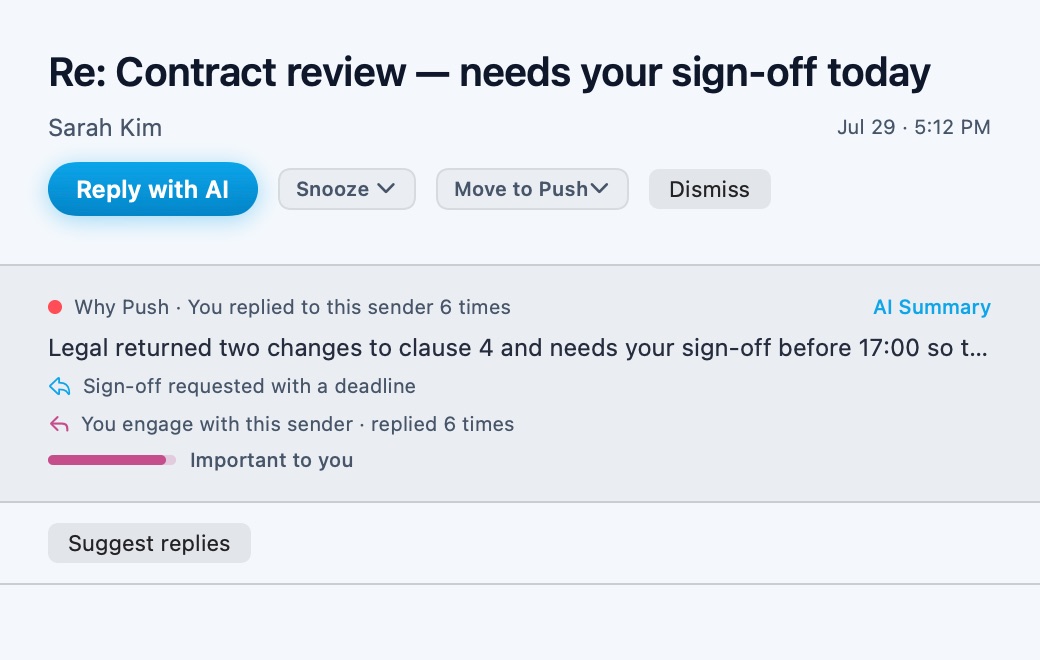
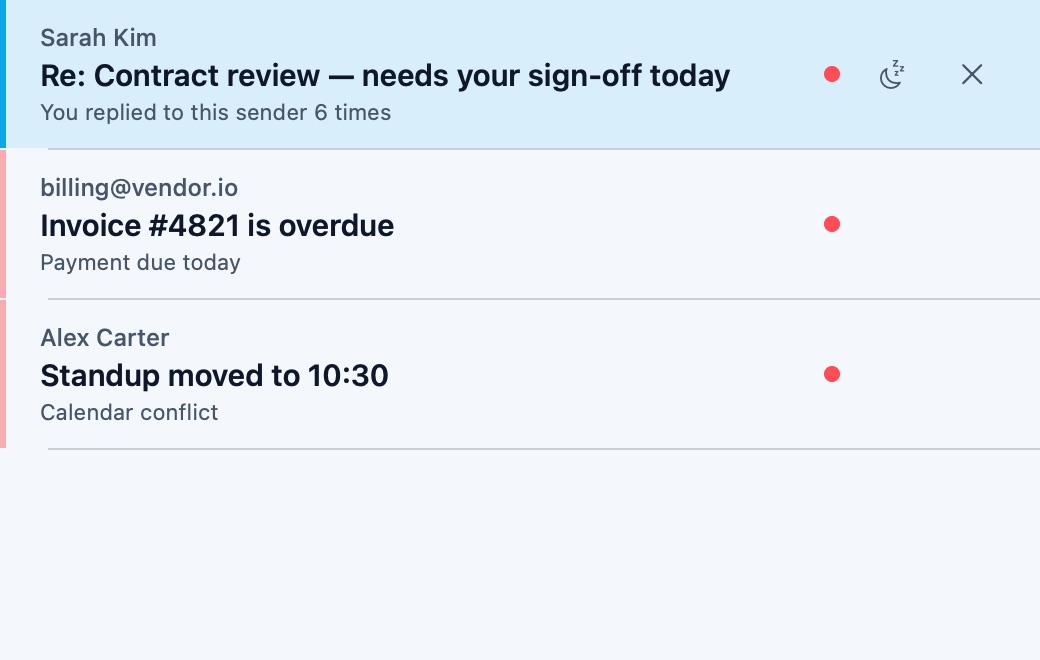
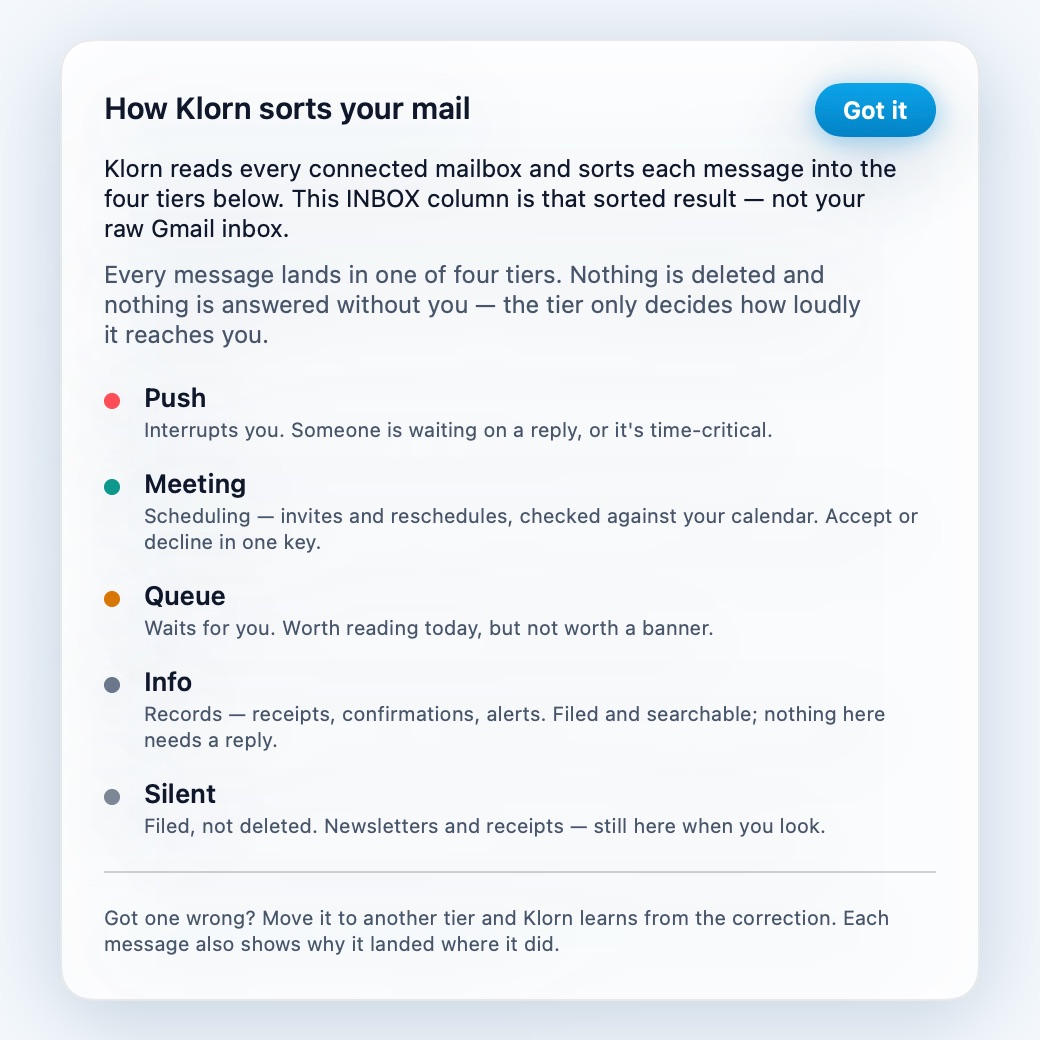
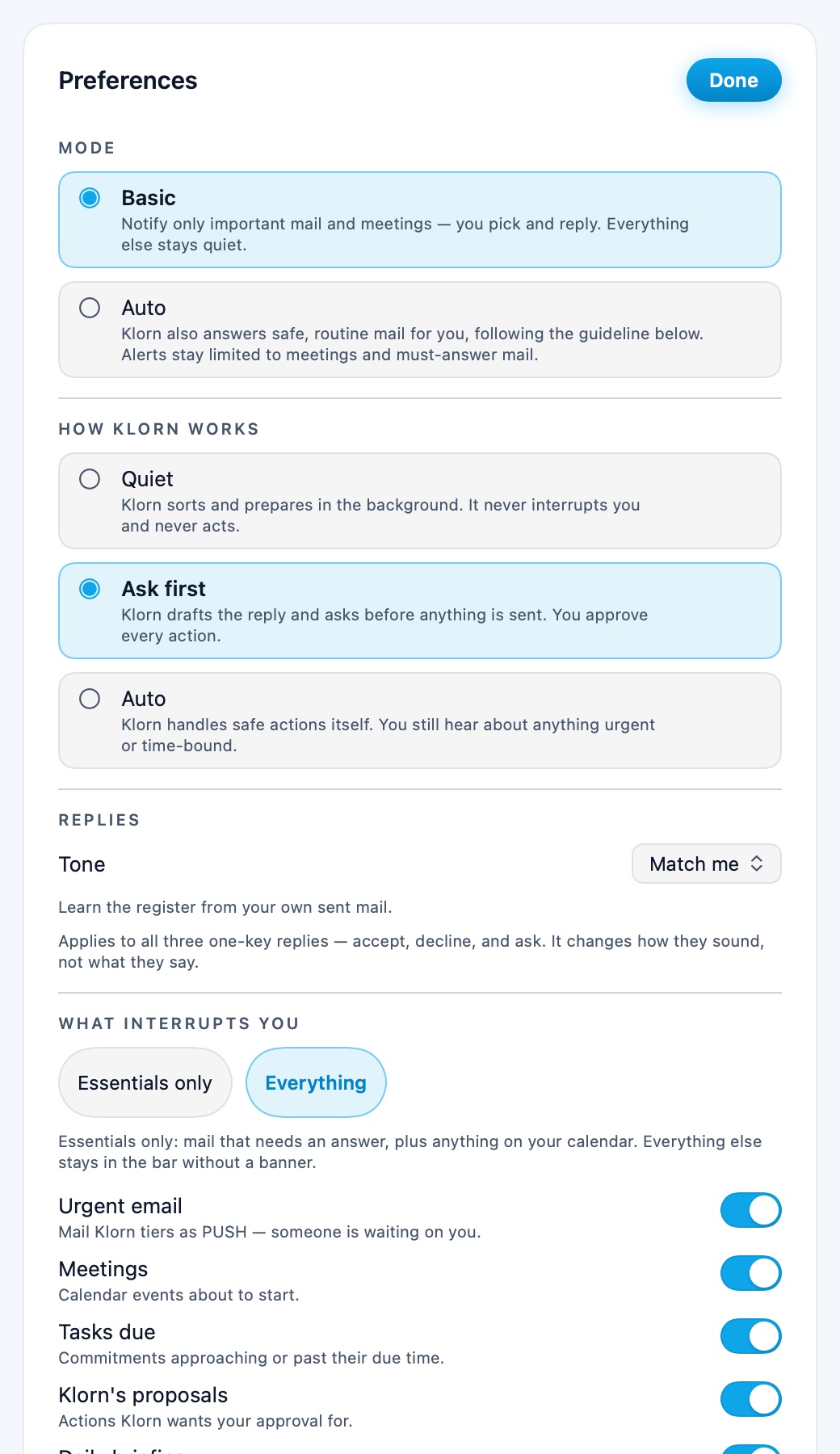
Each shot is produced by KlornMac --render-previews, which draws the
shipping SwiftUI views straight to disk. If a screen changes, the picture changes with it —
there is no separate marketing asset to fall out of date.
Read the app source →
Klorn is not something you open. It runs against your inbox all day and asks for you exactly once — when a message genuinely cannot be answered without you.
Overnight mail is in its tier before you sit down, each one carrying the reason it landed there. Sixty-four messages, three that were yours.
Klorn stays a single native line at the top of the screen. Queue, Silent and Auto never interrupt — only a real Push does, and you set what counts.
Accept, decline or ask — one key each, in your tone and the sender's language. Nothing sends itself; every send mints a receipt.
These are choices, not features — each one costs Klorn something. Set against what the assistant already bundled with your mail decides to do instead.
Sorts and drafts, then stops. Every send, delete and forward waits for you and mints a receipt.
Acts on your behalf and tells you afterwards. Undo is the safety net.
Four fixed tiers, and the reason on every message. Move one and the classifier learns.
Priority flags and unlimited labels. No reason given, and nothing to correct.
94.3% on a hand-labeled set that ships in the repo, cold and warm reported separately.
"AI-powered." No number, no eval set, no way to check it yourself.
AGPLv3. Read it, self-host it against your own keys, or fork it and leave.
Closed. Your mail is the training surface, and export is the only exit.
Every release is scored against a hand-labeled set of real emails before it ships. These are the latest numbers, and the eval set is in the open repo.
50 of 53 hand-labeled real emails sorted into the right tier.
When Klorn files mail as noise, it almost never buries a real signal.
Every send, delete and forward waits for you and logs a signed receipt.
Measured July 2026 on a 53-email hand-labeled set from a live inbox, warm-start with learned context (cold-start: 81.1%). Methodology and eval set →
Klorn reads your mail, so what it connects to is the first thing worth knowing — including what it does not connect to yet.
Not supported: IMAP hosts other than Naver. Signing in to Klorn is Google-only, and there is no native mobile app — mobile runs in the browser today. Klorn's own interface — menus, notifications, its own words — is English and Korean only, whatever language your mail is in. On Windows the desktop app is an unsigned beta (SmartScreen warns once); on Linux, Klorn runs in the browser. Self-hosting works against your own database and model keys.
Coming soon: Outlook & Microsoft 365 and iCloud Mail — already built, staged for rollout after security review. Sign in with Apple and Naver is planned on the web, the Mac app and mobile alike, so one Klorn account covers every device, and native mobile apps are on the way. Planned, but not built yet: the interface in Spanish, French, Japanese and more — unlike the providers above, there is no code for it today. None of it has shipped; this page is where it lands when it does.
An email agent sees everything you receive, so "trust us" is not an answer. The classifier, the prompts and the eval set are all in the repo.
Sorting is free forever. You only pay once Klorn starts drafting and sending on your say-so — the part that costs real money to run.
No card. A daily AI budget keeps it sustainable.
7-day Pro trial, then $8.99/mo on the web. Cancel anytime.
Reading your mail needs Google's restricted scopes, and those need a security review before an app is marked verified. Until that clears you see an unverified-app screen once, and the beta is limited to the first 100 accounts.
No. Send, delete and forward always wait for an explicit approval and each one writes a signed receipt with a hash of exactly what went out.
To the classifier and back. Your OAuth tokens are encrypted at rest, and because the whole thing is AGPLv3 you can read the code that touches them — or run it yourself.
Move it. Every message shows why it landed where it did, and the correction is what the classifier learns from — that is the difference between 81.1% cold and 94.3% warm.
Shipped, as an unsigned beta — SmartScreen warns once until the app is code-signed. The web app remains available in any browser with the same account and tiers.
No. Klorn caps its own spend per day, and stops rather than overspending — a runaway loop costs you nothing. That cap is why sorting stays free.
Free while the beta runs — the first 100 accounts, until Google's review clears.
Already approved? Log in · macOS 14+ universal · Windows in the browser · AGPLv3